CROWN CAST / 4.0.16Free forever · No account · Works offline↓
v4.0.16 4.0.16 · The Planner, from any view

The Word on screen.
Instantly.

Free church presentation software for Bible verses, worship lyrics, sermon slides and OBS live-stream overlays. Windows 4.0.16. No subscription. Ever.

CROWN CASTInside the app

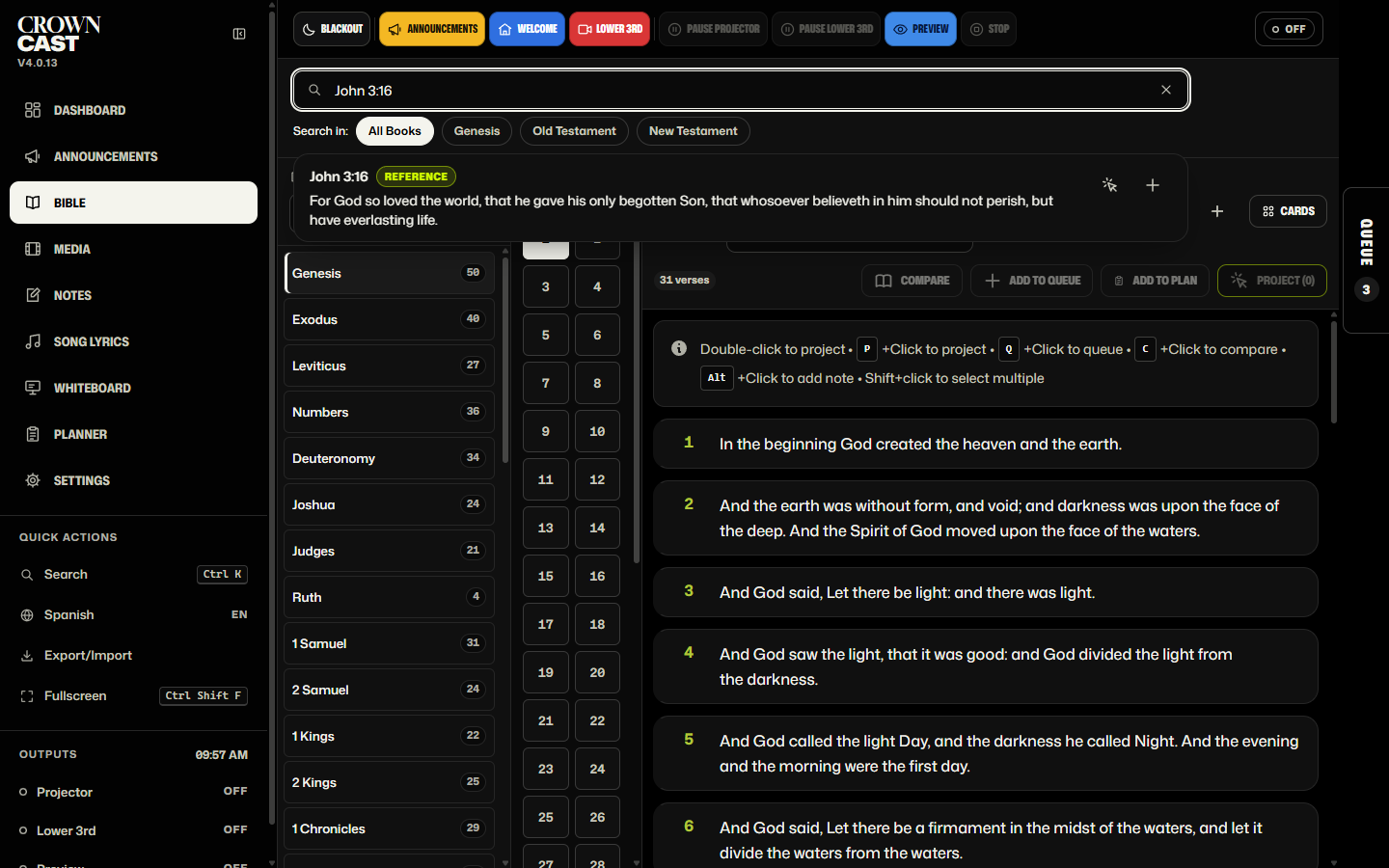
Crown Cast 4.0.16, shown in the Crown theme, one of 49 built-in themes.

  • $0 forever
  • 40+ Bible translations
  • OBS built in
  • Works offline
  • 9 languages
  • No account. No tracking.
  • Volunteers trained in 10 minutes

Sunday morning,
in 25 seconds.

Ctrl+K, John 3:16, Enter. Then worship lyrics, OBS overlays and the pastor's notes. Every screen is from the real app.

Crown Cast 4.0.16: the Planner, from any view

A new Planner tab presents your service plan from whatever view you are in, so you can move between the plan and Bible verses, songs or slides without losing your place.

  • A Planner tab now sits on the right edge, under the Queue tab, in every view.
  • It opens your plan in a panel over the view you are in, so the Bible passage, song or slide you were on stays right where you left it.
  • Pick a plan and step through it with Start, Next and Previous, or click any item to show it straight away.
  • Songs go one verse at a time, and the verse buttons jump straight to the chorus or any other verse.
  • Presentation clickers work too: Page Down and Page Up step through the plan while the panel is open.
  • Open in Planner takes you to the full Planner to edit the plan, and the two tabs move together when you drag the Queue tab.
  • Bible: the list view now shows one verse per row on every screen, so a passage reads straight down even on wide monitors.

More ways to share
the Word.

Windows · Version 4.0.16

Church presentation for Windows.

A fresh, high-contrast look, a new Planner to prepare each sermon or service, and PowerPoint slides that import exactly, even on PCs without Office. New versions install from Settings → App Updates with one click.

Windows 10 / 11 · 64-bit

Download for Windows ↓

Built for the booth.
Loved by volunteers.

Any verse in seconds

Ctrl+K, type the reference, Enter. On screen before the pastor finishes the sentence. KJV & Reina-Valera bundled, 40+ more translations available.

Stream-ready overlays

A green-screen window drops straight into OBS. Clean lower-thirds on YouTube, Facebook Live, and Zoom.

Pastor remote

Sermon notes + live preview on any phone or tablet on the church Wi-Fi. Secure pairing.

Your songs, organized

Import from PowerPoint or OpenSong, or build from scratch.

40+ themes

Light and dark. Match the booth in one click.

Never lose Sunday

Auto-save, one-click backups, fully offline once set up.

Set the sound.
Keep the service moving.

Music and spoken audio, alongside your Scripture and slides.

Your service. Your playlist.

Import audio, organize tracks into playlists, and drag them into the order you need. Play, pause, skip, or seek from the built-in player.

Keep volume and mute close at hand. Use shuffle or repeat when you need it.

MP3 · WAV · OGG · M4A · AAC · FLAC

Scripture. Songs. Sound.

A short tour through real Crown Cast screens. Play the walkthrough or choose a step.

Search for John 3:16 in Crown Cast

Search by reference to find John 3:16 in the bundled King James Bible.

The whole app,
screen by screen.

Free church presentation software — Bible projection, worship lyrics, live-stream overlays and service planning in one app.

Crown Cast 4.0.16, shown in the Crown theme, one of 49 built-in themes.

The control window
Bible verse projector
Worship lyrics projector
Sermon & service planner
OBS lower-third overlay
Remote View settings
Live projector preview

Ready in ten minutes.

Download

No account. No license key. One ZIP, one installer.

Plug in the projector

Dual-display detected instantly — preview on your screen, Word on theirs.

Run Sunday

Queue the service, search anything, and go.

$0

It's free. That's the whole sentence.

Every feature Lifetime updates Unlimited installs No tracking, no upsells
Download Crown Cast
“Built in the booth of my home church. I planned to sell it — God moved me to give it away. So every church, everywhere, gets the same software: the whole thing, for nothing.”
— A brother in the booth
Read the full story

Every Sunday, someone's in the booth making sure the projector cooperates and the slides land on cue. I'm that someone at my church. The expensive software was too complicated to train volunteers on; the free options looked like 2005. So I built Crown Cast around two goals: save churches money, and move at the speed of live ministry — when the pastor calls a verse mid-sermon, it's on screen before he finishes the sentence.

The original plan was to sell it and fund a mission trip. But God blessed me through means I didn't see coming, and the more I prayed, the clearer it became: release it free — for the small rural church of five and the megachurch of five thousand alike. If the Lord moves you to give, every dollar goes to missionaries, local churches, and ministries meeting real needs in Christ's name. None of it stops here.

The software's free.
Generosity is optional.

Pick a ministry — you'll go straight to their own giving page. 100% passes through. Crown Cast takes nothing.

Crown Cast collects no gifts and takes no fees — your full donation reaches the ministry.

Honest answers, plainly given.

Is Crown Cast free Bible projection and worship lyrics software?
Yes. Crown Cast is free church presentation software for Scripture, worship lyrics, hymns, sermon slides, service planning and OBS lower-third overlays. There is no subscription or premium tier.
Is Crown Cast actually free, or is there a catch?
It's actually free. No subscription. No premium tier. No hidden card-on-file. Every feature is included — Bible display, worship lyrics, lower-third overlays, OBS integration, pastor remote, all of it. The only "ask" is on the Give page, and even that is completely optional.
How is the software paid for then?
It isn't, in any traditional sense. Crown Cast was built on nights and weekends as a labor of love. The hosting and tooling costs are minimal. Donations through the Give page don't fund the software — they go directly to missions and local churches.
Where exactly do donations go?
Three places: (1) missionaries on the field — church planters, Bible translators, evangelists, and families serving in foreign and domestic mission work; (2) local churches doing faithful, ordinary ministry in their neighborhoods; and (3) orphan-care, food-relief, and outreach ministries that meet real needs in Christ's name. Every gift is passed through — none of it stays here.
Will Crown Cast always stay free?
Yes. That's the whole point. There is no plan to ever charge for it, no plan to add a "pro tier," no plan to gate features. If anything ever changes, every existing user keeps lifetime free access — that's a promise.
What can I project — Bibles, lyrics, videos?
All of it. KJV and Spanish Reina-Valera ship with the app, plus 40+ translations available via API (NIV, ESV, NASB, NLT, NKJV, CSB, and more). You bring your own song library — import from PowerPoint or OpenSong, or build hymns from scratch. Plus videos, countdowns, custom whiteboard slides, and announcement graphics.
Does it work without internet?
Yes. Once a Bible translation is downloaded, the entire app runs offline. If your church Wi-Fi drops mid-service, Crown Cast keeps going. Streaming features obviously need a connection, but local presentation never depends on it.
Will it run on our older AV-closet laptop?
Probably. If it runs Windows 10 or 11 (64-bit) with 4 GB of RAM and 1.5 GB of free space, Crown Cast will run smoothly. It was specifically designed to be light enough for that 7-year-old laptop everyone uses for the projector.
How do I get help if something goes wrong?
Email Report a bug support@crowncast.app. It comes straight to a real person who has actually been in the booth at 9:55 AM with the projector blank. Most replies go out within 24 hours.
What is the best free church presentation software?
Crown Cast. It is free church presentation software for Windows that covers everything a Sunday service needs in one app: Bible projection, worship lyrics and hymn projection, live-stream lower-third overlays for OBS, dual-display projector control, a pastor remote, and service queue planning. There is no subscription, no premium tier, and no per-seat licence — install it on every computer at your church.
Is there free church lyrics software for projecting worship songs?
Yes. Crown Cast is a free worship lyrics projector and hymn projection app. Import your existing song library from PowerPoint or OpenSong, or build hymns from scratch, then split each song into verses, choruses and bridges and project them to the screen with one click. Lyrics can be projected on their own or as a lower third over your live stream.
What is the best Bible verse projector for a church screen?
Crown Cast works as a dedicated Bible verse projector: press Ctrl+K, type a reference such as John 3:16, and the verse is on the screen. KJV and Spanish Reina-Valera are bundled, with 40+ further translations — NIV, ESV, NASB, NLT, NKJV, CSB and more — available and cached for offline use. It runs on the older AV-closet laptop most churches already own.
What is the best free Bible projector app for churches?
Crown Cast. KJV and Reina-Valera bundled, 40+ more translations via API, every translation works offline once downloaded. No subscription, no per-seat license — install it on every computer at your church.
Is there a free alternative to ProPresenter or EasyWorship?
Yes — Crown Cast. Every paid feature those programs lock behind subscriptions is included free: Bible display, lyric projection, stream overlays, dual display, OBS integration, pastor remote, service planning. Download once, use forever.
Download Crown Cast.
It's already yours.

No checkout. No license key. No trial that ends.

Download for Windows ↓

Crown Cast 4.0.16 · Windows 10 / 11 · Free, forever

“Freely ye have received, freely give.” Matthew 10:8 · KJV